

Anonymized
Generic tokens: [PERSON], [LOCATION]…
When you don't need to keep links between occurrences.
How it works
Safe-Doc secures external AI usage with a simple process: pseudonymize (or anonymize), analyze, de-anonymize.
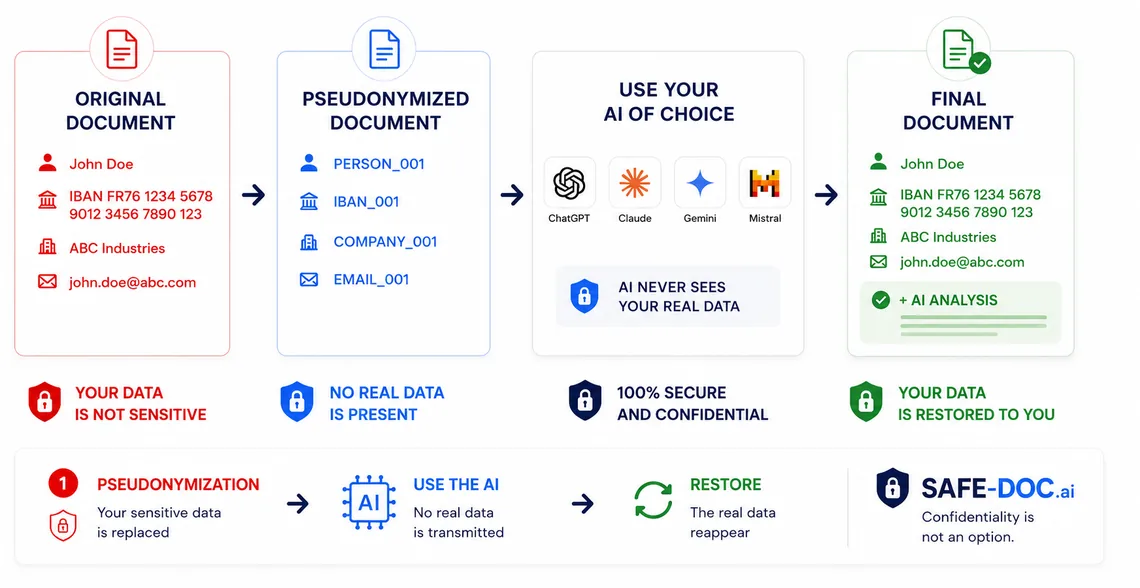
Paste a document excerpt: Safe-Doc detects and replaces personal data before AI. No storage, no real data sent to a model.
Open the live demo on a contract, email, or HR note.
Open the interactive demoWith pseudonymization, the same entity remains the same pseudonym across documents.
Great for diligence, contracts, multi-piece case files.
Generic tokens: [PERSON], [LOCATION]…
When you don't need to keep links between occurrences.
Numbered, consistent tokens: [PERSON_1], [ORG_2].
Best to preserve narrative consistency across a document set.
Readable replacements (invented names/addresses) for a "natural" text.
Useful for review and presentation while masking real values.
Higher levels reduce re-identification through context (dates, amounts, locations, writing style).
Direct identifiers (PII) and risky context: tokenization, cleanup and generalization (dates, amounts, locations, references).
Stylistic fingerprint and weak signals. Roadmap Q3 2026.
Goal: keep useful meaning while reducing identifiability.
Automated detection can produce false positives and false negatives. Indicators (residual scan / leakage score) help assess risk, but don't replace a final review.
Ready to try it on a real document?