


Chrome extension, beta
The Chrome extension that pseudonymizes your messages in ChatGPT and Claude
You write as usual. Before sending, Safe-Doc replaces names, companies and amounts with aliases. When the answer arrives, the real names are put back in the page. No copy and paste.
Optional: the web app does the same with a copy and paste.
You write
Write a reminder to Martha Lewis at Durand & Sons about her unpaid invoice of £4,820.
ChatGPT receives
Write a reminder to [PERSON_1] at [ORG_1] about her unpaid invoice of [AMOUNT_1].
You read the answer
Dear Martha Lewis, unless we are mistaken, the invoice of £4,820 issued to Durand & Sons is still unpaid…
Works in
- ChatGPT
- Claude
- Gemini
- Mistral
- Perplexity
- Copilot
Where your data goes when you click Send
Your message goes through Safe-Doc, in Europe, before reaching the AI. The AI only receives aliases, and the real names come back in your browser.
- 1
Your browser
You write your message and attach files with the Safe-Doc paperclip. The table linking each alias to its real value stays here.
- 2
Safe-Doc, in Europe
Detects more than 90 types of data and replaces them with stable aliases. The text is purged after processing, with no third-party AI.
- 3
ChatGPT, Claude…
The AI works on
[PERSON_1]and[ORG_1]. It never sees the real names. - 4
Back in the page
The answer arrives with the aliases. The extension puts the real names back, in your browser.
A button next to the input box
As soon as you open ChatGPT, Claude or another compatible AI, a small floating button appears near the input box.
- 1The paperclip attaches your files (PDF, Word, spreadsheet) through Safe-Doc: they are sent protected, like the message.
- 2The shield turns protection on. Green: everything you send is pseudonymized.
Good to know: an image (screenshot, photo of a document) is sent as is. Attach the original document instead.

 1
2
3
4
All the settings fit in one window
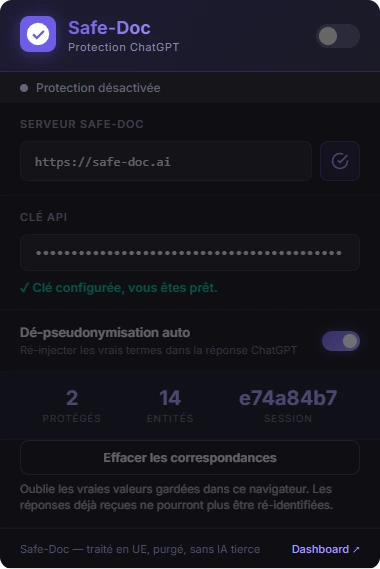
Click the shield icon in the Chrome toolbar to open the extension window. The interface is in French during the beta.
- 1The switch turns protection on or off. The API key field confirms when everything is set up.
- 2Automatic de-pseudonymization puts the real names back into the AI's answers, right in the page.
- 3The counters show protected messages, masked items and the current session.
- 4Clear the mappings deletes the real values kept in this browser. Useful at the end of a matter or on a shared computer.
Install the extension in 3 steps
Allow two minutes. You need Google Chrome and a Safe-Doc account with an API key, included from the Pro plan (see pricing).
Download
In your Safe-Doc space, Extension menu, download the .zip file and unzip it. You get a
safedoc-chrome-extensionfolder.Load it in Chrome
Open
chrome://extensions, turn on Developer mode at the top right, click Load unpacked and choose the folder. Pin the shield icon.Connect your key
In your space, API menu, generate your key: it fills in the extension on its own. Otherwise, paste it into the API key field.
During the beta, installation goes through developer mode. One-click installation from the Chrome Web Store is coming.
Extension or web app: your choice
The extension
For people who spend their day in ChatGPT or Claude. Protection happens in the chat window, and the answer comes back with the real names, with no copy and paste.
The web app
Nothing to install. You drop in a document or paste a text, check what is masked, and send it to the AI of your choice. Ideal if your IT department blocks extensions.
What is guaranteed
- Processed in Europe, then purged. No document is kept, and Safe-Doc uses no third-party AI to do this work.
- The table stays with you. The link between each alias and its real value is kept in your browser, and you can clear it at any time.
- The AI only sees aliases. You keep your ChatGPT or Claude subscription; only the data you send changes.
FAQ
Is the extension required?
No. It is for people who want Safe-Doc right in the chat window. The web app does the same with a copy and paste, and the API or the MCP server cover automated uses.
Which AI tools does it work with?
ChatGPT, Claude, Gemini, Mistral, Perplexity and Copilot, in Google Chrome.
What about Firefox, Edge or Safari?
During the beta, the extension is available for Chrome only.
Are my attachments protected?
Yes, if they are attached with the Safe-Doc paperclip: PDF, Word and spreadsheets are pseudonymized like the message. Images are sent as is.
My IT department blocks developer mode. What can I do?
Some companies forbid extensions installed in developer mode. Use the web app until the Chrome Web Store version is available.
What happens if I clear the mappings?
The real values are deleted from your browser. New messages work normally, but answers already received will keep their aliases.
Our guides on this topic
 GuideChatGPT, Claude and confidential documents: how to use them without exposing your dataCan you send confidential documents to ChatGPT, Claude or Copilot? The real risks, what enterprise plans change, the cloud and the CLOUD Act, the contract clauses to require, and pseudonymization before sending.Read the guide
 GuideShadow AI: why banning it fails, and how to bring it under control in 90 daysShadow AI explained: the concrete GDPR risks, why bans fail, a 7/30/90-day action plan for IT and privacy teams, an AI acceptable use policy, and pseudonymizing documents before they reach AI.Read the guide
Keep ChatGPT and Claude. Protect what you send them.
A full 10-day trial, no credit card. The extension downloads from your space.